
Apr 27, 2026Updated Oct 10, 2026
Power BI Writeback: A Complete Solution Inside the Embedsy Portal
ByPascal Kiefer

Writeback has been one of the most requested and most painful topics in Power BI for years. Users want to enter data, set targets, correct values — but Power BI is read-only by design. Every workaround comes with trade-offs. The Embedsy Portal solves this cleanly, from within the portal itself.
The writeback problem in Power BI
Power BI is a reporting and analytics tool — it reads data, visualises it, and lets users explore it. What it does not do natively is let users write data back. This has been a fundamental limitation for years, and it creates a real problem for organisations that want to use Power BI as part of an interactive workflow — not just a passive dashboard.
Why writeback matters
Many business processes require a combination of reading and writing data. Budget planning, target setting, action tracking, annotations — all of these require users to input or adjust data, not just view it. Without writeback, Power BI becomes a dead end in those workflows. Users end up switching to Excel, a separate form, or another tool entirely — defeating the purpose of a centralised analytics platform.
The common approaches and their trade-offs
Over the years, several workarounds have emerged. Each solves part of the problem but comes with its own costs and complexity.
PowerApps embedded in Power BI
Microsoft's most promoted solution is embedding a PowerApps form directly inside a Power BI report. It works — users can submit data through the embedded app — but it requires a separate PowerApps license, adds design and maintenance overhead, and often feels visually disconnected from the rest of the report.
Custom visuals
Third-party custom visuals for writeback exist and can be powerful, but typically come at significant additional cost — separate per-user licensing on top of Power BI — and require careful setup and ongoing maintenance. They also only work within the report itself, limiting where and how users can interact with data.
Translytical task flows
Microsoft introduced Translytical task flows as a native way to add data entry to Power BI reports. It is promising but still early, requires Fabric, and involves a non-trivial setup process. For teams not yet on Fabric, or those who need a simpler and more controlled experience, it is not yet a practical solution.
The common problem
All of these approaches share the same weakness: they add complexity, cost, or dependency on additional Microsoft services. None of them feel like a natural part of the analytics experience — they feel like workarounds bolted on top of a read-only tool.
How writeback works in the Embedsy Portal
The Embedsy Portal takes a different approach. Because the portal runs inside your own Azure environment — including an Azure SQL Database that is deployed as part of the installation — it has a natural place to store writeback data.
The full flow
- Define your writeback table in the portal. Through the Embedsy Portal interface, you define the structure you need: numbers, dates, text, dropdown lists with fixed values, and formatted text for comments. The portal creates and manages the corresponding table in the Azure SQL Database automatically.
- Share it with the people who fill it in. You give a table to one or more roles and decide what their members may do: view all rows or only their own, and edit all rows or only the ones they added. The table then appears in their menu under Data Entry.
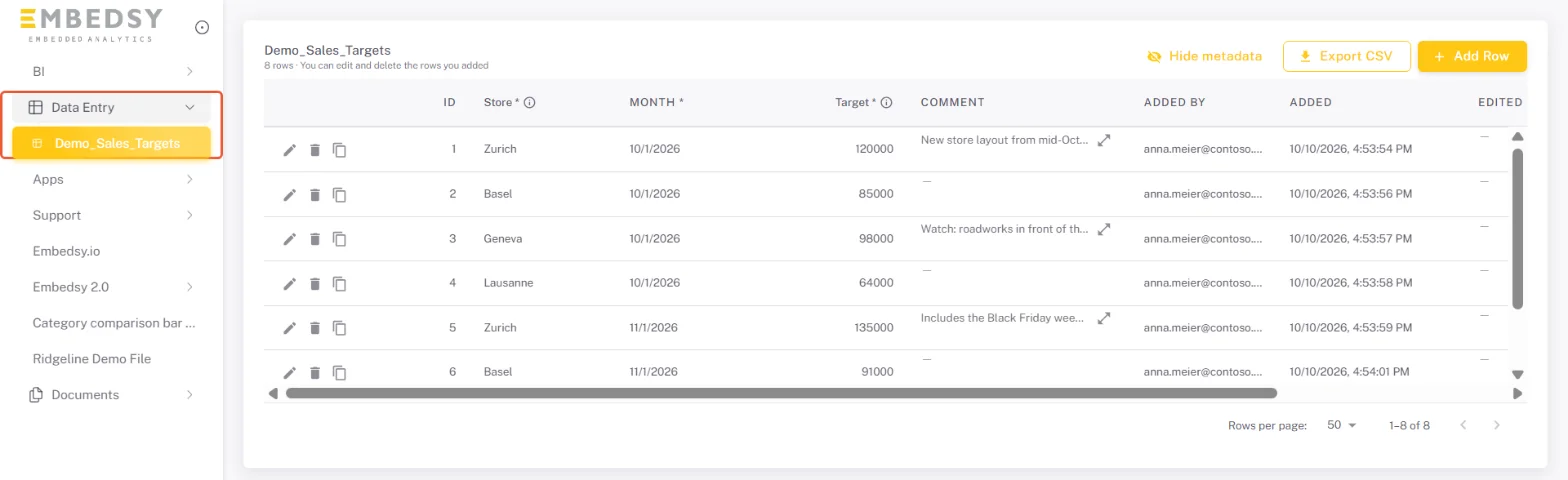
- Users write data through the portal. They add, edit and copy rows in a grid, directly inside the analytics environment they already use, without switching to another tool. Every row records who added it and when.
- The data is loaded back into the Power BI semantic model. The portal gives each table a read-only database login and a ready Power BI query to paste into Power BI Desktop. Reports show the new entries after the next refresh, or straight away if the table uses DirectQuery, closing the circle.
What it looks like
Here is a sales target table shared with store managers. It sits in the portal menu under Data Entry, right next to the reports:
And this is what the admin sees once a read-only user can read the table: the query to copy into Power BI Desktop.
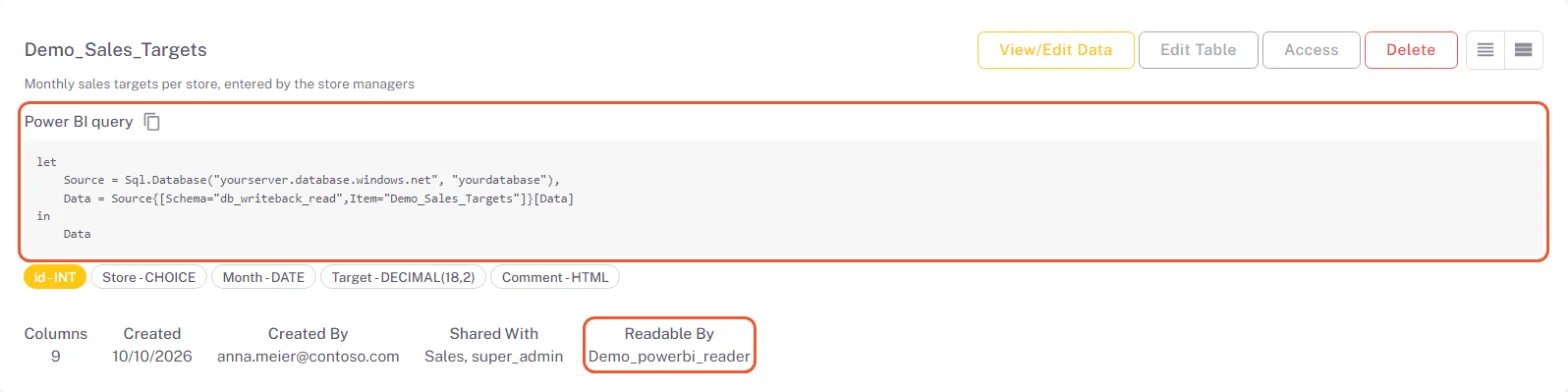
And this is what the admin sees once a read-only user can read the table: the query to copy into Power BI Desktop.
Why this approach works
Because the SQL database is part of your own Azure environment, there are no external dependencies, no third-party services, and no data leaving your infrastructure. The writeback experience is part of the portal — not an add-on — so it feels natural to users, and it uses the same roles that already decide who sees which report. And because it uses standard SQL and Power BI connectivity, it is straightforward to maintain and extend.
What you can build with it
Writeback in the Embedsy Portal is flexible. Here are some examples of what organisations are using it for:
- Budget and forecast input — Finance teams enter budget figures or adjust forecasts directly inside the portal, and they flow back into the financial reports.
- Target setting — Managers set KPI targets for their teams. Targets appear in dashboards alongside actuals without any manual export or import.
- Action tracking — Teams log actions, decisions, or follow-ups against specific data points — turning a read-only dashboard into an operational tool.
- Annotations and comments — Users add context to data points, visible to others through the same portal.
Included in your plan — no extra cost
One more thing worth mentioning: writeback is included in the standard Embedsy pricing. There is no additional module to purchase, no per-user writeback fee, and no third-party tool to license. If you are already running the Embedsy Portal, writeback is available to you: it is a preview feature that an admin switches on in Global Settings.
The Writeback page gives the overview, and the Writeback documentation walks through every step, from creating a table to connecting Power BI. The same steps are also in four short videos on YouTube. If you want to see how writeback works in practice — including a live demonstration inside a real portal — book a demo and we will walk you through it.
Related reading

May 11, 2026
Power BI Embedded with Direct Lake — What You Need to Know

Pascal Kiefer

Jul 6, 2026
What We Built for the FIFA World Cup 2026
Pascal Kiefer
Mar 14, 2025Updated Oct 10, 2026
Webinar - Power BI Embedded in Action: The Call Center Use Case
Pascal Kiefer
See also