
The Embedsy Portal: Power BI for your customers and partners, branded as yours
Launch your branded Power BI portal in days — not months.
The Embedsy Portal is a secure, white-label web application for delivering Power BI analytics to any audience — customers, partners, or internal teams — through a fully branded experience deployed in your own Azure environment.
Prefer a live walkthrough? Book a free demo
Looking for the numbers? See pricing
What you get
- Live in days — no months of custom development
- Deliver analytics to any user: customers, partners, internal teams
- No Power BI Pro licenses required for your end users
- Fully branded under your domain and identity
- Always deployed in your own Azure environment — you own the data
- Built by a Microsoft Partner specialized in Power BI Embedded
Embedsy at a glance
- Price
- From 80 USD per month: 4 USD per user, 20 users included. Free for 30 days.
- Viewer licences
- None. Viewers need no Power BI Pro or Premium Per User licence.
- Hosting
- In your own Azure subscription, in the region you choose.
- Capacity
- A Fabric or Power BI Embedded capacity, billed by Microsoft. Auto-pause is included.
- Time to launch
- Live in days. Install it yourself, or free with us on a call.
- What you need
- An active Azure subscription and Global Admin rights.
Who uses the Embedsy Portal
For anyone who shares Power BI reports: with customers, partners or their own teams.
Customer portals
Give your customers dashboards and reports in a portal with your branding, without a Power BI Pro licence for each viewer.
Partner and reseller reporting
Share analytics with partners, resellers or franchisees. Each one sees only their own data, with access set per role.
Internal teams
Give employees, from field staff to the board, the reports they need in one portal with Microsoft sign-in.
Your branding, per customer if you like
Logo, colours and your own domain. Each customer or role can get its own look, so every audience sees a portal that feels like theirs.
Custom features where you need them
Where the standard features stop, add your own: custom data apps built with Embedsy Studio, or features we develop for you.
Platform experience
The Embedsy Portal provides a complete analytics experience including navigation, access control, branding and administration. Power BI reports become part of a structured analytics product inside your portal.
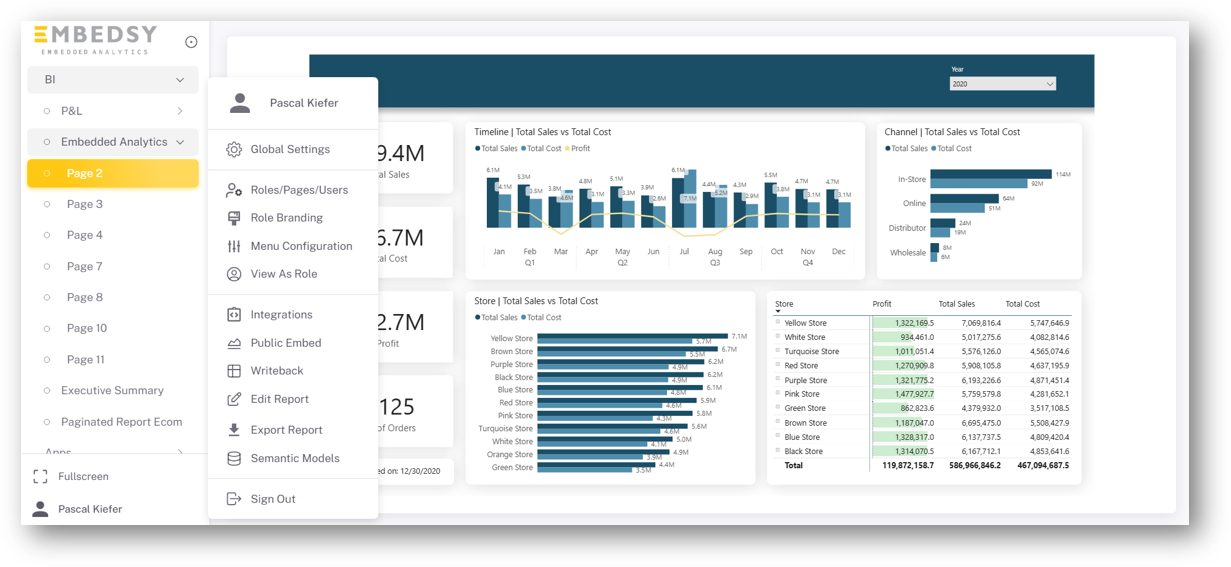
The Embedsy Portal
A portal home page: the menu groups reports and pages by topic, each user sees only what their role allows, and admins manage users, roles, branding and settings from the same menu.
Navigation and Report Interaction
Moving through a portal: interactive Power BI reports, a paginated report, an embedded Power App, a booking page and a PDF, each a page in the menu you configure.
White-Label Branding
Role Branding: each role gets its own logo, favicon and colours, and View As Role shows the portal exactly as that client sees it.
Architecture
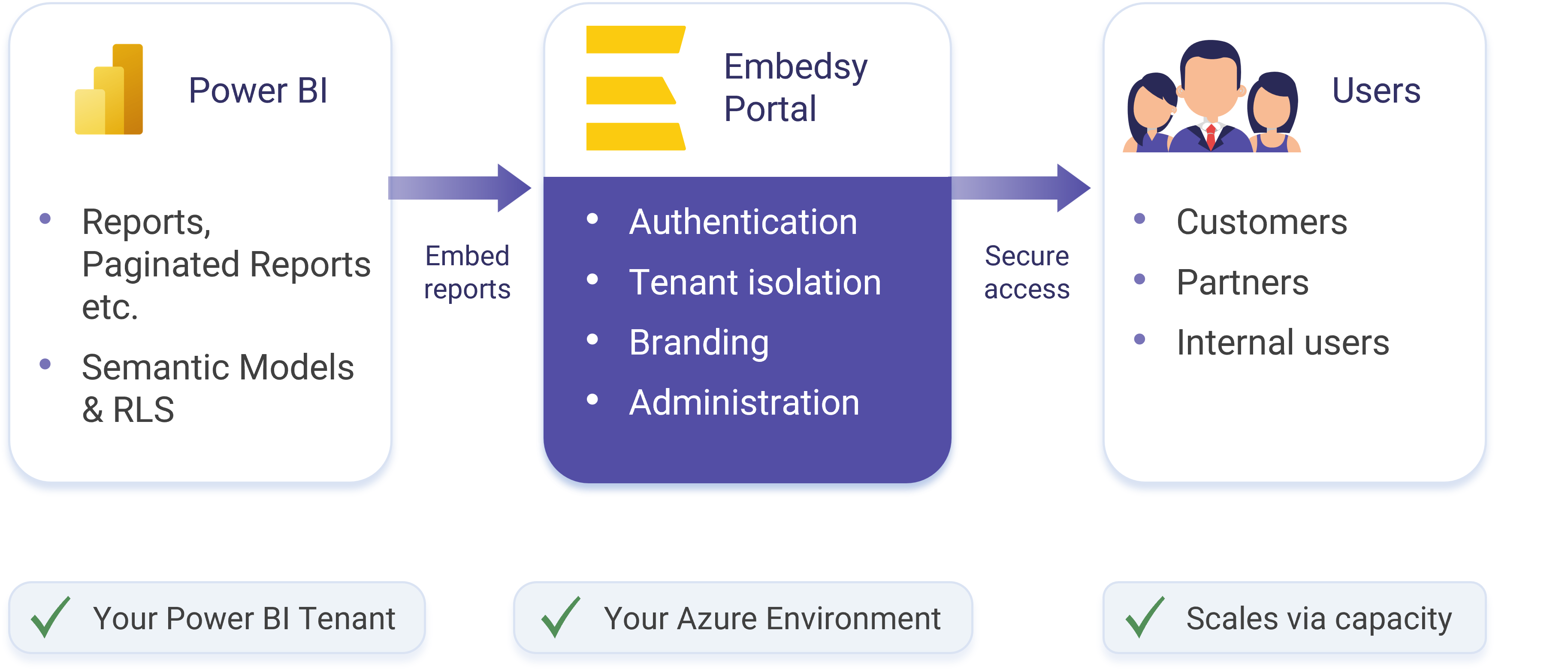
Reports stay inside your Azure tenant at all times. The portal adds the authentication, access control and branding layer on top — without moving your data.
Platform capabilities
The Embedsy Portal provides the capabilities required to run a secure Power BI analytics portal — under your brand, connected to your Power BI environment.
Customer-owned deployment
The Embedsy Portal runs in your own Azure environment, so you keep full control over infrastructure, data and security.
Secure access
Centralize authentication and authorization with clear access control, including Row-level Security (RLS).
Multi-tenant distribution
Deliver analytics securely to multiple customers, partners and teams while keeping access and content separated.
Flexible authentication
Integrate Microsoft Entra ID and other login providers to have a seamless experience.
White-label experience
Deliver analytics under your own branding and domain so the portal feels like part of your product or organization.
Each client sees their own brand
Give every client their own logo, favicon, colors and even the loading spinner in the same portal, or generate them from the client's website in seconds. How client branding works
Central administration
Manage users, roles, design and other aspects from a single administrative interface.
Writeback
Enable users to create tables in the database, write data to it and load this data back into Reports. How writeback works
Documents
Share PDFs, spreadsheets, images and other files in the same portal as your reports, with folder access per role. Sharing documents in the portal
Public and secure embed
Support secure embedding scenarios and public sharing when required, with the right controls around access.
Capacity management
Run the capacity around the clock, or let the portal start it on use and pause it when nobody is working. How Smart Capacity pauses your capacity
Considering building your own Power BI Embedded solution?
Building a custom embedded analytics portal is a significant undertaking — authentication, multi-tenancy, branding, maintenance and more. We've laid out the full comparison so you can make an informed decision.
See the Embedsy Portal in action
See how the portal works, how access is managed, and how branding turns analytics into part of your product.
Prefer a live walkthrough? Book a free demo