
Sep 3, 2026
Multi-Tenancy in Power BI Embedded: A Workspace per Customer, RLS, or Both?
ByPascal Kiefer
If several different customers look at your Power BI content, there is one decision worth making deliberately rather than by accident: how you keep them apart.
It rarely feels urgent at the start, because with a handful of customers almost anything works. It matters later, because the choice quietly shapes how much work you do every time you add a customer or change a report.
There are two common ways to do it, and they combine perfectly well. Neither is universally right, and the useful part is that the question is settled by things you can simply check. Here is what each one involves, and when using both makes sense.
It rarely feels urgent at the start, because with a handful of customers almost anything works. It matters later, because the choice quietly shapes how much work you do every time you add a customer or change a report.
There are two common ways to do it, and they combine perfectly well. Neither is universally right, and the useful part is that the question is settled by things you can simply check. Here is what each one involves, and when using both makes sense.
First, which "tenant" do you mean?
The word does at least three jobs in this conversation, and most confusion comes from people meaning different ones:
• An Entra (Azure AD) tenant — a Microsoft identity boundary: your customer's own Microsoft organisation, with their own users and domains.
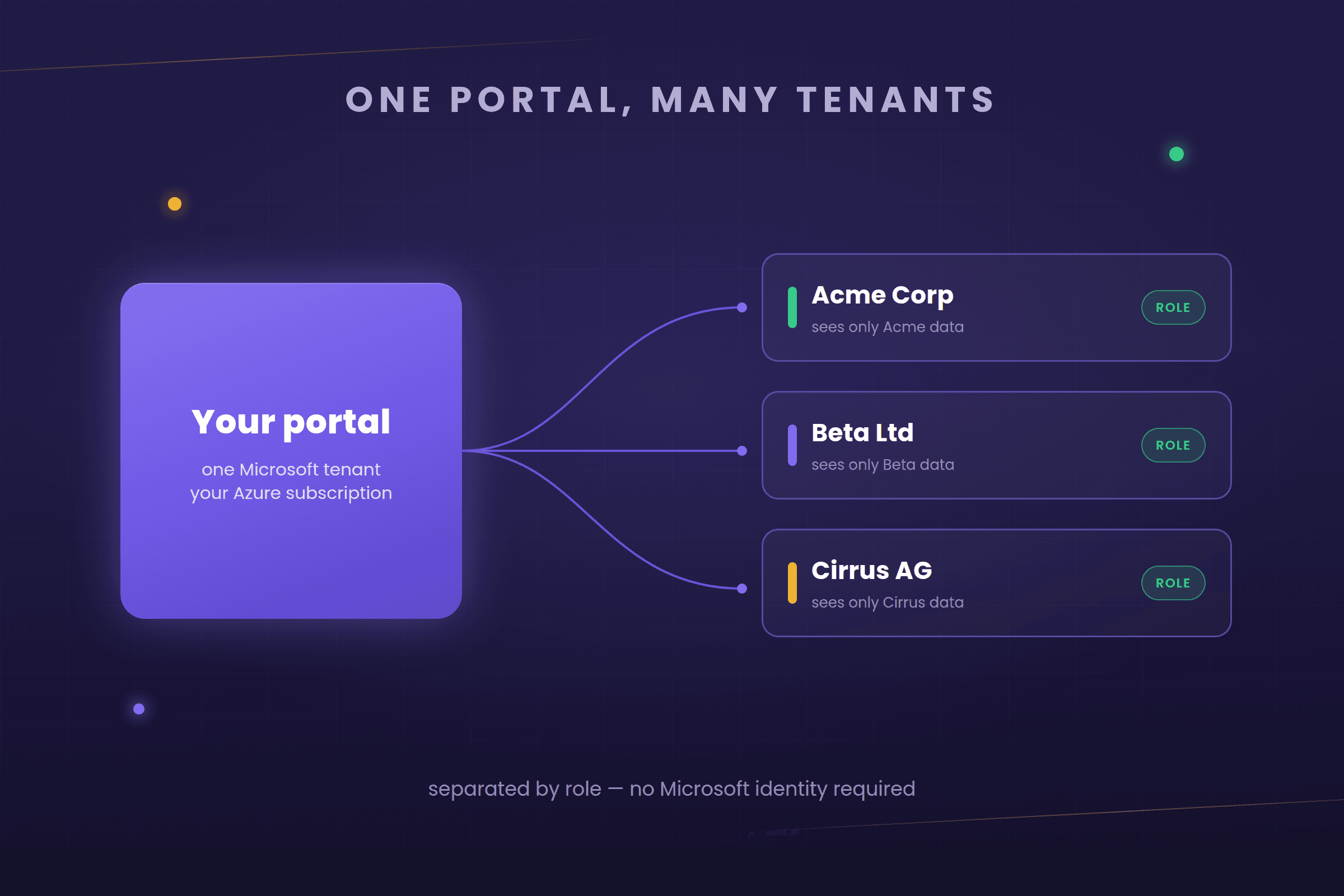
• A tenant as in one of your customers — Acme Corp is a tenant of your portal, and their people should only ever see Acme's numbers. No Microsoft identity is implied here; they may have no Microsoft account at all.
• A Power BI workspace — where the content actually lives. Often one per customer, which is why it gets mixed up with the other two.
This article is about the second one: one portal, several customers, and confidence that each of them sees only their own numbers. Whether your customers also bring their own Microsoft accounts is a separate question — about signing in, not about keeping data apart.
• An Entra (Azure AD) tenant — a Microsoft identity boundary: your customer's own Microsoft organisation, with their own users and domains.
• A tenant as in one of your customers — Acme Corp is a tenant of your portal, and their people should only ever see Acme's numbers. No Microsoft identity is implied here; they may have no Microsoft account at all.
• A Power BI workspace — where the content actually lives. Often one per customer, which is why it gets mixed up with the other two.
This article is about the second one: one portal, several customers, and confidence that each of them sees only their own numbers. Whether your customers also bring their own Microsoft accounts is a separate question — about signing in, not about keeping data apart.
The two ways to keep customers apart
Both are answers to the same question: where does the separation actually happen?
A workspace for each customer
Each customer gets their own Power BI workspace, holding their own copy of the reports. The separation is physical — one customer's content simply sits somewhere else — which makes it easy to explain and easy to trust.
The trade-off is upkeep. Change a report and you update it in each workspace; add a customer and you set one up rather than adding a record. With a handful of customers that is hardly noticeable, and it grows steadily as the list does.
The trade-off is upkeep. Change a report and you update it in each workspace; add a customer and you set one up rather than adding a record. With a handful of customers that is hardly noticeable, and it grows steadily as the list does.
One shared model with row-level security
Everyone shares a single model, and row-level security decides what each person sees. The portal tells Power BI who is asking, and Power BI returns only that customer's rows.
This is the lighter one to run: one model to maintain, one set of reports to update, and adding a customer is a record rather than a setup job. Microsoft suggests it suits setups with a smaller number of customers and models that are not especially large.
What it asks in return is care with the rules, because the separation lives in your role definitions rather than in separate workspaces. They are worth writing carefully and testing before you rely on them — ordinary work, and well understood, but the part to be deliberate about.
This is the lighter one to run: one model to maintain, one set of reports to update, and adding a customer is a record rather than a setup job. Microsoft suggests it suits setups with a smaller number of customers and models that are not especially large.
What it asks in return is care with the rules, because the separation lives in your role definitions rather than in separate workspaces. They are worth writing carefully and testing before you rely on them — ordinary work, and well understood, but the part to be deliberate about.
In practice, often both
The two are not really rivals. They answer different questions, and plenty of setups use them together.
Keeping customers apart is one question. What each person inside a customer sees is another. A common arrangement handles them separately: a workspace per customer for the first, and row-level security within each workspace for the second — so Acme's content sits apart from Beta's, and inside Acme the regional managers each see only their own region.
The other combination is just as valid. One shared model can do both jobs at once, with row-level security filtering first by customer and then by person.
So the question is less which one and more where does each boundary belong. If you only ever need to separate customers, one mechanism is enough. As soon as people within a customer need to see different things, row-level security comes into it regardless of how you separated the customers in the first place.
Keeping customers apart is one question. What each person inside a customer sees is another. A common arrangement handles them separately: a workspace per customer for the first, and row-level security within each workspace for the second — so Acme's content sits apart from Beta's, and inside Acme the regional managers each see only their own region.
The other combination is just as valid. One shared model can do both jobs at once, with row-level security filtering first by customer and then by person.
So the question is less which one and more where does each boundary belong. If you only ever need to separate customers, one mechanism is enough. As soon as people within a customer need to see different things, row-level security comes into it regardless of how you separated the customers in the first place.
How to choose
A few questions usually settle it:
• How many customers do you expect? With a smaller number and modest data, the shared model with row-level security is genuinely fine and much less to run. As the list grows, separate workspaces start to earn their extra upkeep.
• Will customers ask how their data is kept separate? "Each of you has your own workspace" is a simpler answer to give than "a filter decides what you see", and for some customers that settles it on its own.
• Does everyone see the same reports? If customers need genuinely different content, a shared model starts working against you, and separating them becomes a practical choice rather than a security one.
• Who keeps it running? Separate workspaces mean repeating each update, so it is worth knowing whose job that is before you choose.
• How much data is there? A shared model holds everybody's data at once, so it is worth a thought if one customer is much larger than the rest.
Microsoft's FastTrack team has a useful write-up comparing the options if you want a second view.
• How many customers do you expect? With a smaller number and modest data, the shared model with row-level security is genuinely fine and much less to run. As the list grows, separate workspaces start to earn their extra upkeep.
• Will customers ask how their data is kept separate? "Each of you has your own workspace" is a simpler answer to give than "a filter decides what you see", and for some customers that settles it on its own.
• Does everyone see the same reports? If customers need genuinely different content, a shared model starts working against you, and separating them becomes a practical choice rather than a security one.
• Who keeps it running? Separate workspaces mean repeating each update, so it is worth knowing whose job that is before you choose.
• How much data is there? A shared model holds everybody's data at once, so it is worth a thought if one customer is much larger than the rest.
Microsoft's FastTrack team has a useful write-up comparing the options if you want a second view.
The one thing worth deciding early
The thing worth avoiding is not choosing the wrong option. It is not choosing at all.
It usually goes like this: a first version is built for one customer, a second customer arrives, copying the workspace is the quickest route, and that becomes the setup without anyone really deciding it should be.
That is easy to avoid. Decide how you are separating customers, note why, and note roughly when that would stop suiting you. If that point is within your plans, choose accordingly now — moving across later is perfectly doable, it is just a project rather than an afternoon.
It usually goes like this: a first version is built for one customer, a second customer arrives, copying the workspace is the quickest route, and that becomes the setup without anyone really deciding it should be.
That is easy to avoid. Decide how you are separating customers, note why, and note roughly when that would stop suiting you. If that point is within your plans, choose accordingly now — moving across later is perfectly doable, it is just a project rather than an afternoon.
Where we come in
Worth being precise about where the Embedsy Portal sits in this, because it is not where people assume.
It runs in your Microsoft tenant, not ours. The portal deploys into your own Azure subscription, alongside your own Power BI tenant and capacity. Your data never passes through an Embedsy tenant, because no such tenant exists in the path. In the Microsoft sense this deployment is not multi-tenant at all — it is one tenant, and it is yours.
Inside the portal, a tenant is a role. When several of your own customers use the same portal, roles are what separate them: a role defines which Power BI reports and other pages someone may open, and what they see once they are in them, and users are assigned to it. That is the whole mechanism — no Microsoft identity required anywhere, which is what lets you serve customers who have never heard of Power BI. If the people using the portal are in your own Microsoft Entra directory, Entra groups can drive those roles, so access follows groups you already manage. Worth being precise about whose directory that is: the portal reads groups from the tenant it is installed in — yours — not from your customers' own directories, which it never sees.
The Power BI side of the decision stays yours. This is the part worth stressing: the portal does not impose either of the two options above. A workspace per customer, or every customer in one workspace behind RLS — both work, and which you pick is a decision about your data, your scale and your security requirements, not about your portal. The access layer looks the same either way.
That cuts both ways, and it should. It means you are not locked into somebody else's idea of how isolation ought to work. It also means the choice is still genuinely yours to get right — everything above still applies, and if you would rather talk it through with someone who has set these up before, that is a conversation worth having before it becomes a migration.
It runs in your Microsoft tenant, not ours. The portal deploys into your own Azure subscription, alongside your own Power BI tenant and capacity. Your data never passes through an Embedsy tenant, because no such tenant exists in the path. In the Microsoft sense this deployment is not multi-tenant at all — it is one tenant, and it is yours.
Inside the portal, a tenant is a role. When several of your own customers use the same portal, roles are what separate them: a role defines which Power BI reports and other pages someone may open, and what they see once they are in them, and users are assigned to it. That is the whole mechanism — no Microsoft identity required anywhere, which is what lets you serve customers who have never heard of Power BI. If the people using the portal are in your own Microsoft Entra directory, Entra groups can drive those roles, so access follows groups you already manage. Worth being precise about whose directory that is: the portal reads groups from the tenant it is installed in — yours — not from your customers' own directories, which it never sees.
The Power BI side of the decision stays yours. This is the part worth stressing: the portal does not impose either of the two options above. A workspace per customer, or every customer in one workspace behind RLS — both work, and which you pick is a decision about your data, your scale and your security requirements, not about your portal. The access layer looks the same either way.
That cuts both ways, and it should. It means you are not locked into somebody else's idea of how isolation ought to work. It also means the choice is still genuinely yours to get right — everything above still applies, and if you would rather talk it through with someone who has set these up before, that is a conversation worth having before it becomes a migration.
Related reading

Sep 18, 2024Updated Sep 21, 2026
Row-Level Security (RLS) in Power BI Embedded: How It Works and How to Set It Up

Vlad Mihanta
Sep 10, 2026
How to Build a White-Label Power BI Portal for Your Customers (2026)

Pascal Kiefer

Nov 19, 2024Updated Sep 10, 2026
How to Share Power BI Reports with External Users Without a Pro License (2026)
Vlad Mihanta
See also