
Sep 10, 2026
Copilot Doesn't Work in Power BI Embedded. Here's What to Give Your Customers Instead
ByPascal Kiefer
Every customer conversation about embedded analytics now includes a version of the same question: can our users just ask the data a question?
The expectation is set. People use AI assistants everywhere else, and a dashboard that only answers questions somebody anticipated in advance feels dated next to that. So the natural move is to reach for Power BI Copilot — it is right there in the product, and Microsoft has spent the last two years putting it in front of everyone.
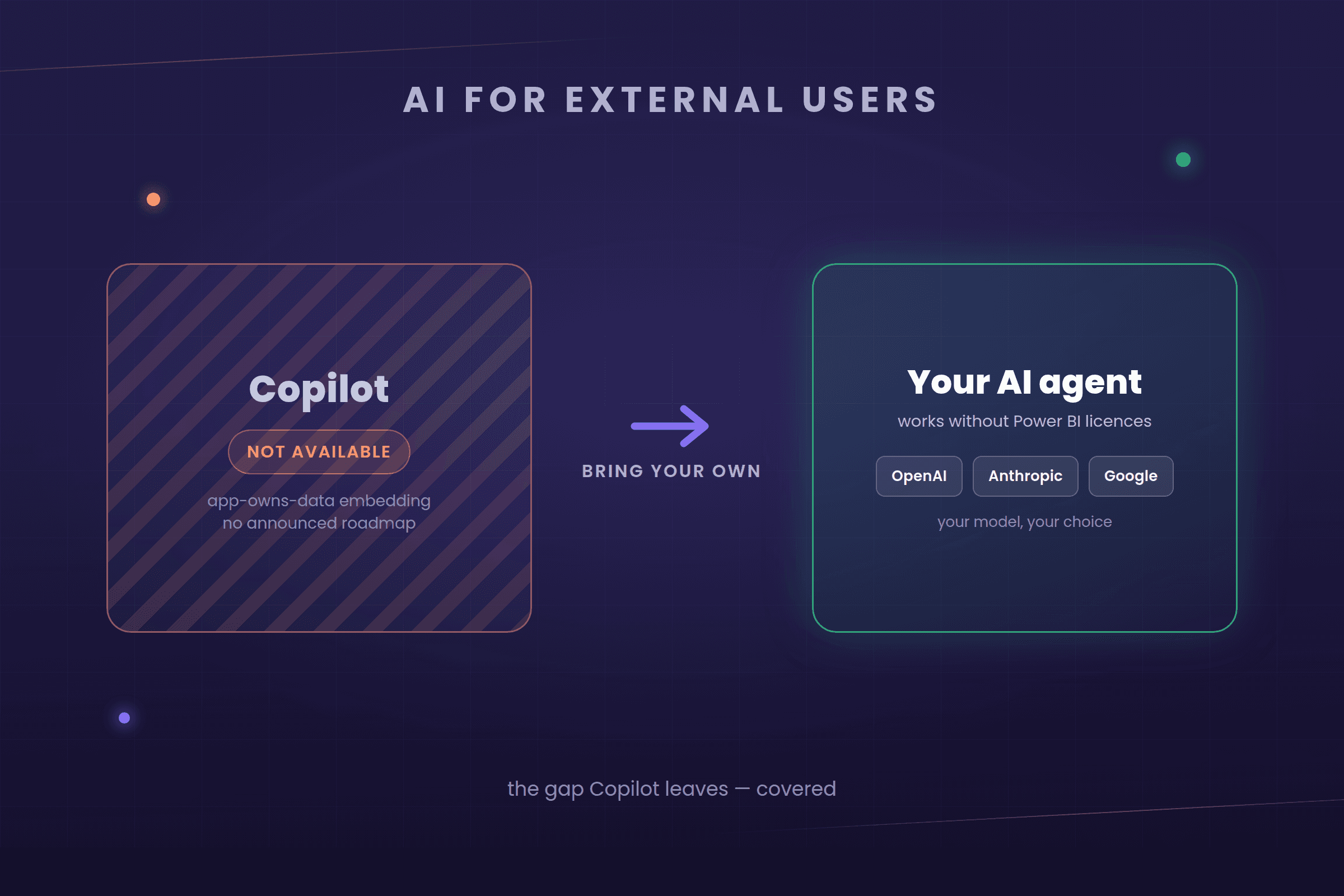
Then you discover it does not work where you need it. Not "needs configuration", not "requires a higher tier" — genuinely unavailable in the embedding model that serves external customers, with no announced plan to change.
The expectation is set. People use AI assistants everywhere else, and a dashboard that only answers questions somebody anticipated in advance feels dated next to that. So the natural move is to reach for Power BI Copilot — it is right there in the product, and Microsoft has spent the last two years putting it in front of everyone.
Then you discover it does not work where you need it. Not "needs configuration", not "requires a higher tier" — genuinely unavailable in the embedding model that serves external customers, with no announced plan to change.
Where Copilot works, and where it stops
The distinction that matters is which embedding model you use.
Secure embed (user-owns-data) — every viewer signs in with their own Microsoft identity and holds a paid Power BI licence, and the content sits on Fabric capacity. Copilot works here, subject to the tenant switch being enabled and the capacity requirements being met. This is the internal-portal scenario: your own employees, your own tenant.
App-owns-data (service principal) — your application authenticates on behalf of the user with a service principal, and viewers need no Microsoft account and no Power BI licence at all. Copilot is not supported here. The Copilot pane — the part your users would actually talk to — is unavailable under this model. The one exception is the Copilot narrative visual, which Microsoft opened to app-owns-data embedding in preview in 2026: a generated summary inside a report, not an assistant your customers can ask questions.
That second model is not a niche configuration. It is how analytics reaches people outside your own organisation, for the straightforward reason that you cannot ask them all to buy Power BI licences first.
That has been the position since the 2025 release wave and it has not changed through 2026. The request is well supported in the Fabric community, and Microsoft has published no roadmap or timeline for it. A feature with a date can be waited for. A feature with no date cannot go in a roadmap you show customers. This area moves quickly, so treat the specifics here as accurate at the time of writing and re-check the current documentation before you build a plan on them.
Secure embed (user-owns-data) — every viewer signs in with their own Microsoft identity and holds a paid Power BI licence, and the content sits on Fabric capacity. Copilot works here, subject to the tenant switch being enabled and the capacity requirements being met. This is the internal-portal scenario: your own employees, your own tenant.
App-owns-data (service principal) — your application authenticates on behalf of the user with a service principal, and viewers need no Microsoft account and no Power BI licence at all. Copilot is not supported here. The Copilot pane — the part your users would actually talk to — is unavailable under this model. The one exception is the Copilot narrative visual, which Microsoft opened to app-owns-data embedding in preview in 2026: a generated summary inside a report, not an assistant your customers can ask questions.
That second model is not a niche configuration. It is how analytics reaches people outside your own organisation, for the straightforward reason that you cannot ask them all to buy Power BI licences first.
That has been the position since the 2025 release wave and it has not changed through 2026. The request is well supported in the Fabric community, and Microsoft has published no roadmap or timeline for it. A feature with a date can be waited for. A feature with no date cannot go in a roadmap you show customers. This area moves quickly, so treat the specifics here as accurate at the time of writing and re-check the current documentation before you build a plan on them.
Why this lands so badly when you share externally
The gap falls precisely where the commercial need is greatest.
App-owns-data exists so that people outside your organisation can use your analytics without Microsoft licensing getting in the way. Those external users — your customers, their staff, their clients — are exactly the audience asking for natural language, because they are the least likely to be trained on your reports and the most likely to want a plain answer rather than a filter panel.
So the feature is available to the audience with the least need for it (licensed internal analysts who already know their way around a report) and unavailable to the audience with the most (unlicensed external users opening your reports for the first time). That is the wrong way round.
App-owns-data exists so that people outside your organisation can use your analytics without Microsoft licensing getting in the way. Those external users — your customers, their staff, their clients — are exactly the audience asking for natural language, because they are the least likely to be trained on your reports and the most likely to want a plain answer rather than a filter panel.
So the feature is available to the audience with the least need for it (licensed internal analysts who already know their way around a report) and unavailable to the audience with the most (unlicensed external users opening your reports for the first time). That is the wrong way round.
The workarounds, and what they actually cost
Three routes get proposed. Two of them are worse than they look:
• Move everyone to secure embed and licence them. This does deliver Copilot. It also means every external user needs a Microsoft identity in your tenant and a paid licence — which reverses the reason you chose embedded analytics, and turns a per-customer conversation into a per-seat one. For a handful of people it is arguable. For hundreds or thousands of external viewers it is not.
• Wait. Free, and it might come. But there is no date, and in the meantime the question keeps arriving in sales calls.
• Provide the AI layer yourself. More work up front, and it is the only route that puts you in control of when your customers get an answer.
• Move everyone to secure embed and licence them. This does deliver Copilot. It also means every external user needs a Microsoft identity in your tenant and a paid licence — which reverses the reason you chose embedded analytics, and turns a per-customer conversation into a per-seat one. For a handful of people it is arguable. For hundreds or thousands of external viewers it is not.
• Wait. Free, and it might come. But there is no date, and in the meantime the question keeps arriving in sales calls.
• Provide the AI layer yourself. More work up front, and it is the only route that puts you in control of when your customers get an answer.
Bring the AI, not the Copilot
Once you stop trying to make Copilot reach across the gap, the problem becomes more tractable than it first appears. The pieces you need are a semantic model that already describes your data, a way to turn a question into an answer from it, and somewhere to put the conversation in the interface.
This is the approach we took with AI agents in Embedsy Studio, and the same agents are available in the Embedsy Portal. An agent is a reusable configuration — a name, a set of instructions, and optionally a library of skills — defined once and then used by any number of apps or pages. Some agents answer from the data itself; others explain, summarise or guide someone around a report without touching the numbers at all.
This is the approach we took with AI agents in Embedsy Studio, and the same agents are available in the Embedsy Portal. An agent is a reusable configuration — a name, a set of instructions, and optionally a library of skills — defined once and then used by any number of apps or pages. Some agents answer from the data itself; others explain, summarise or guide someone around a report without touching the numbers at all.
Your model, your choice
The difference that matters most over time is not what the assistant can answer this quarter — it is who decides which model answers.
Copilot is Microsoft's model, on Microsoft's terms, on Microsoft's schedule. For plenty of organisations that is entirely fine. It is not fine when your customer's procurement team has a view about which AI vendors may process their data, or when a model you depend on changes behaviour underneath you.
In Embedsy, the model is a choice: OpenAI, Anthropic, Google and others. And it is a choice per agent, not per portal: you can run several agents on different models and decide which semantic model is answered by which one. Two consequences follow:
• An AI vendor restriction stops being a blocker. If a customer has standardised on one provider, or ruled one out, you can meet that requirement instead of losing the deal.
• You are not exposed to a single vendor's roadmap. Pricing changes, deprecations and new capabilities become a configuration decision rather than a rebuild.
The AI bill goes straight to Microsoft. Embedsy supports Microsoft Foundry (the service most people still know as Azure AI Foundry), running in your own Azure subscription alongside everything else. AI usage is metered and charged to you by Microsoft directly: no Embedsy markup, no bundled allowance to outgrow. It is the same arrangement as your Fabric capacity — we do not resell it, so we have nothing to gain from you spending more on it. And because usage-based billing is harder to predict than a per-seat licence, we walk through setting up an Azure budget as part of installation, so you are alerted long before a bill becomes a surprise.
And you choose where it runs. Because the deployment is yours, so is the region. If your policy says data stays in Switzerland, or in the EU, you deploy the model there and can say so plainly when a customer asks. Not every model is available in every region, so the choice is between what Microsoft offers there — but it is your choice to make, and for plenty of organisations that single question decides whether AI features are permitted at all.
Copilot is Microsoft's model, on Microsoft's terms, on Microsoft's schedule. For plenty of organisations that is entirely fine. It is not fine when your customer's procurement team has a view about which AI vendors may process their data, or when a model you depend on changes behaviour underneath you.
In Embedsy, the model is a choice: OpenAI, Anthropic, Google and others. And it is a choice per agent, not per portal: you can run several agents on different models and decide which semantic model is answered by which one. Two consequences follow:
• An AI vendor restriction stops being a blocker. If a customer has standardised on one provider, or ruled one out, you can meet that requirement instead of losing the deal.
• You are not exposed to a single vendor's roadmap. Pricing changes, deprecations and new capabilities become a configuration decision rather than a rebuild.
The AI bill goes straight to Microsoft. Embedsy supports Microsoft Foundry (the service most people still know as Azure AI Foundry), running in your own Azure subscription alongside everything else. AI usage is metered and charged to you by Microsoft directly: no Embedsy markup, no bundled allowance to outgrow. It is the same arrangement as your Fabric capacity — we do not resell it, so we have nothing to gain from you spending more on it. And because usage-based billing is harder to predict than a per-seat licence, we walk through setting up an Azure budget as part of installation, so you are alerted long before a bill becomes a surprise.
And you choose where it runs. Because the deployment is yours, so is the region. If your policy says data stays in Switzerland, or in the EU, you deploy the model there and can say so plainly when a customer asks. Not every model is available in every region, so the choice is between what Microsoft offers there — but it is your choice to make, and for plenty of organisations that single question decides whether AI features are permitted at all.
AI is only as good as your semantic model
One expectation worth setting early, because it applies to every AI over Power BI — ours, Copilot, or anything else: the assistant reads your semantic model, and the quality of that model sets the ceiling on the answers.
A language model has no independent knowledge of your business. What it has is your table and column names, your relationships, your measures, and whatever descriptions you have written. Those are its documentation. If a column is called Col7, if two measures both look like they might be revenue, if a relationship is missing so orders cannot be connected to customers, the assistant is left guessing — and a guess phrased fluently is exactly the kind of wrong answer that is hard to catch.
The encouraging part is that the reverse holds just as strongly. A clean star schema with plain names, properly defined measures and a few sentences of description will produce noticeably better answers without anyone touching the AI configuration at all.
It is also the same work that makes reports fast, which is why optimising a model tends to pay for itself twice over. So if the answers disappoint, look at the model before you look at the prompt.
A language model has no independent knowledge of your business. What it has is your table and column names, your relationships, your measures, and whatever descriptions you have written. Those are its documentation. If a column is called Col7, if two measures both look like they might be revenue, if a relationship is missing so orders cannot be connected to customers, the assistant is left guessing — and a guess phrased fluently is exactly the kind of wrong answer that is hard to catch.
The encouraging part is that the reverse holds just as strongly. A clean star schema with plain names, properly defined measures and a few sentences of description will produce noticeably better answers without anyone touching the AI configuration at all.
It is also the same work that makes reports fast, which is why optimising a model tends to pay for itself twice over. So if the answers disappoint, look at the model before you look at the prompt.
What to ask of any AI layer in embedded analytics
Whether you build this yourself, use ours, or evaluate someone else's, these are the questions that separate a demo from something you can put in front of customers:
• Does it return real numbers or generated ones? An assistant that executes a query against the model is auditable. One that produces figures from a language model's context is a liability, however confident it sounds.
• Where does the data go? Which provider, which region, under what retention terms — and can you answer that in a customer security review without hedging?
• What does it cost, and who pays? Per-question AI costs scale with usage in a way per-seat licensing does not. Know the unit economics before you offer it to everyone.
• What happens when it does not know? A system that says "I cannot answer that from this model" is far more valuable in front of customers than one that always produces something.
• Who can configure it? If every new question type requires a developer, it will not keep pace with what customers ask.
• Does it return real numbers or generated ones? An assistant that executes a query against the model is auditable. One that produces figures from a language model's context is a liability, however confident it sounds.
• Where does the data go? Which provider, which region, under what retention terms — and can you answer that in a customer security review without hedging?
• What does it cost, and who pays? Per-question AI costs scale with usage in a way per-seat licensing does not. Know the unit economics before you offer it to everyone.
• What happens when it does not know? A system that says "I cannot answer that from this model" is far more valuable in front of customers than one that always produces something.
• Who can configure it? If every new question type requires a developer, it will not keep pace with what customers ask.
Where we come in
The portal deploys into your own Azure subscription, so the data an agent queries stays in your environment and the AI configuration is yours to govern, not a vendor's black box.
If you are being asked for AI in your analytics and have hit this wall, we are happy to talk through what is actually possible today — including the parts where the honest answer is that a feature is not there yet.
If you are being asked for AI in your analytics and have hit this wall, we are happy to talk through what is actually possible today — including the parts where the honest answer is that a feature is not there yet.
Related reading

Jul 6, 2026
What We Built for the FIFA World Cup 2026

Pascal Kiefer

Apr 27, 2026Updated Oct 10, 2026
Power BI Writeback: A Complete Solution Inside the Embedsy Portal
Pascal Kiefer
Sep 10, 2026
How to Build a White-Label Power BI Portal for Your Customers (2026)
Pascal Kiefer
See also