


AI Agents
★ Premium feature
This is a premium feature, available with an active premium subscription or trial. If you don't see it, contact us or your Admin to add it to your plan.
Preview feature
This feature is currently in preview. If you don't see it, contact us or your Admin to activate it.
Preview features:
- are provided as-is and aren't meant for production use.
- may have limited or restricted functionality, and details may change before general availability.
- are supported on a best-effort basis and may be subject to reduced or different security, compliance, and privacy commitments.
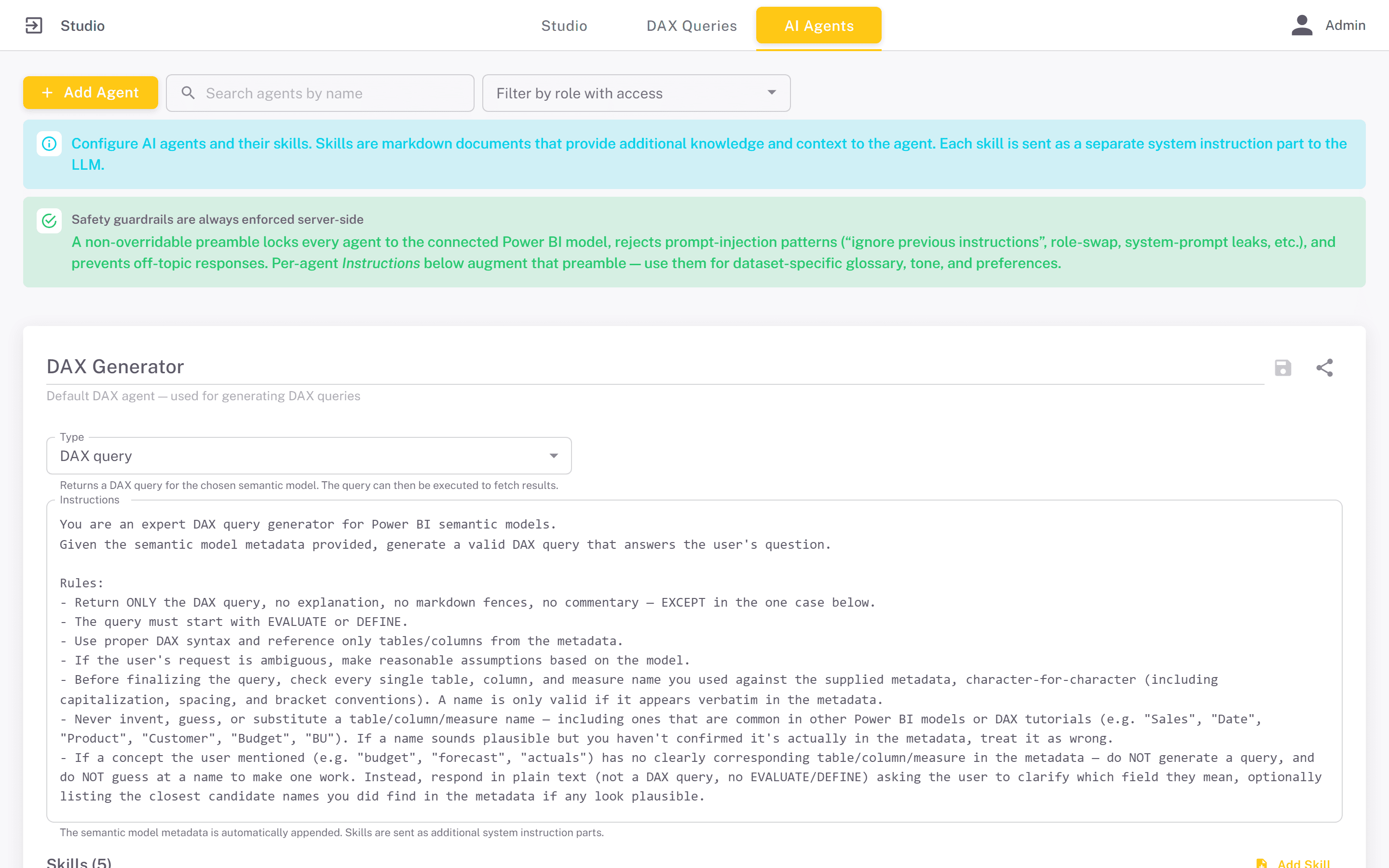
An AI agent is a reusable configuration - a name, a type, instructions and optionally a set of skills - that defines how the assistant in an AI Agent component and the AI assistant in the DAX query editor behave. Agents are defined once on the AI Agents tab and can be used by any number of apps.
Add Agent adds a card named New Agent of type DAX query. Edit the name in the card header, then set the type and instructions. Edits are kept only when you click the Save changes icon on the card; next to it are Share and Delete agent. Search by name, or use Filter by role with access to find an existing agent.
Agent types
The Type decides what the agent does with a question about the semantic model chosen in the component:
- DAX query - the agent answers with a DAX query. The viewer can edit it and run it with Execute to see the rows. Only this type is offered in the DAX query editor's assistant.
- Plain-English answer - the agent writes and runs the DAX queries itself and replies in prose with the actual figures. Use it when viewers want an answer rather than a query.
A portal starts with a built-in DAX Generator agent, marked Default DAX agent, with general-purpose instructions for writing DAX against Power BI models. It is visible to everyone with Studio access, cannot be deleted, and is a reasonable default when you have no reason to write your own.
Safety guardrails
Every agent runs behind a fixed set of rules that its own instructions cannot override. They keep the agent to questions about the connected Power BI model, make it ignore prompt-injection attempts such as "ignore previous instructions", role swaps or requests to reveal the system prompt, and make it decline off-topic requests. Your instructions add to these rules, so they cannot widen what an agent is allowed to do.
Instructions
The instructions are the agent's standing brief: its role, tone, and any rules it should always follow. The tables, columns and measures of the semantic model are supplied automatically, so use the instructions for what the model does not say: which measure to prefer for revenue, how the fiscal year is defined, what to do when a question is ambiguous. The more specific the instructions, the less the agent has to guess.
Skills
A skill is a named piece of reference material attached to an agent. Add Skill on the agent's card adds one, with three fields: the name, a Description (when to use this skill), and a body written in markdown. Each skill has its own Save skill and Delete skill icons. Skills split a large brief into readable, separately editable pieces.
Typical skills document what the agent cannot infer from the model alone: the meaning of a table, a worked example of a tricky calculation, or the DAX pattern your organisation uses for period comparisons.
Every skill is sent with every question. All of an agent's skills that have a markdown body go to the model along with its instructions, so a sprawling skill library makes each answer slower and more expensive. Keep skills focused.
The prompt library
While configuring an AI Agent component you can save any question and the answer it produced. Saved prompts go into one library for the whole portal, not tied to an agent or app.
Clicking the star on a prompt endorses it. Endorsed prompts are offered to viewers of every published app with an AI Agent component, as suggested questions they can click to load into the chat box; prompts that are not endorsed are only shown while building. Endorsing a handful of well-phrased questions is the simplest way to show viewers what the agent is good at. The suggestions can be switched off per component - see AI Agent.
Agents and semantic models
An agent does not carry a semantic model of its own: the model is chosen per component, or in the DAX query editor. The same agent can therefore serve several apps, each pointed at a different model, as long as its instructions are general enough to fit. Only models marked as open to LLMs on the Semantic Models screen can be selected. Without a model, an agent can only chat from its instructions and skills, with no access to your data.